Objective
Manually configure routing paths between routers using static routes.
Lab Topology
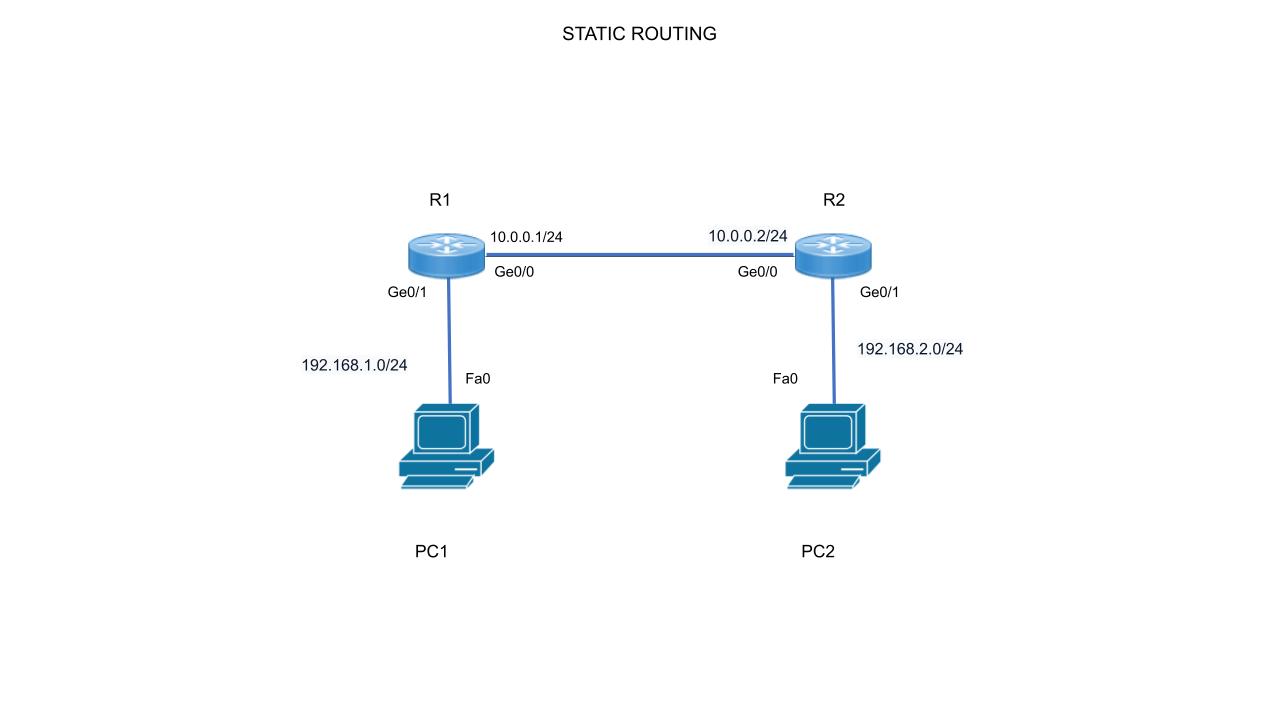
Task 1 - Configure Static Route on R1
Tell R1 how to reach R2's LAN.
R1(config)# ip route 192.168.2.0 255.255.255.0 10.0.0.2
Task 2 - Configure Default Route on R2
Configure a default route on R2 to send all unknown traffic to R1.
Understanding Default Routes
A Default Route (also known as the Gateway of Last Resort) is a special type of static route that matches all destination IP addresses for which a specific route does not exist in the routing table. It is represented by the destination network 0.0.0.0 and subnet mask 0.0.0.0.
Why is it used?
- Path of Last Resort: It provides a standard path for traffic destined for the Internet or any external network not explicitly defined in the routing table.
- Reduced Routing Table Size: It prevents the routing table from becoming unnecessarily large by replacing multiple specific routes with a single "catch-all" entry.
- Resource Management: It saves router CPU and memory by minimizing the number of routing calculations and table entries required.
R2(config)# ip route 0.0.0.0 0.0.0.0 10.0.0.1
Task 3 - Verification
R1# show ip route static
S    192.168.2.0/24 [1/0] via 10.0.0.2

R2# show ip route static
S*   0.0.0.0/0 [1/0] via 10.0.0.1