Objective
Configure a Router and Switch to allow communication between VLAN 10 and VLAN 20 using sub-interfaces.
Lab Topology
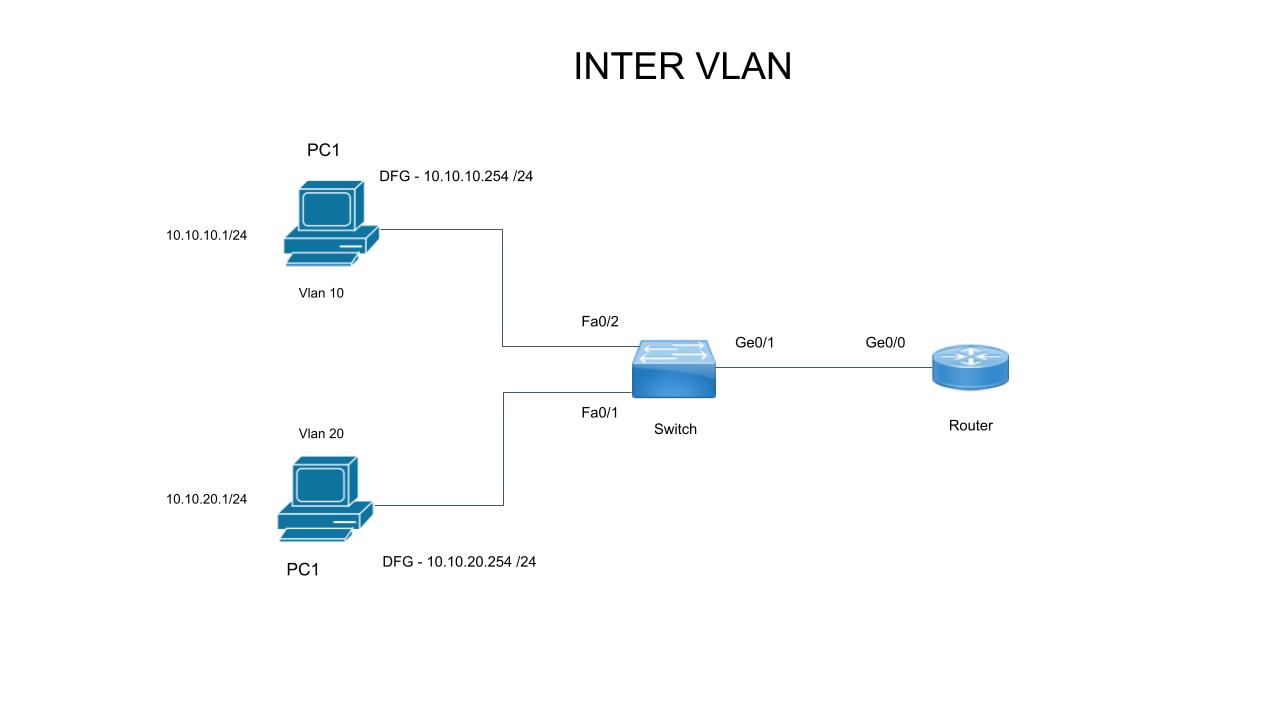
Task 1 - Switch Configuration (Basics & Trunking)
SW1(config)# hostname SW1
SW1(config)# vlan 10
SW1(config)# vlan 20
SW1(config)# interface gigabitEthernet 0/1
SW1(config-if)# switchport mode trunk
SW1(config-if)# no shutdown
Task 2 - Router Sub-interfaces (ROAS)
R1(config)# hostname R1
R1(config)# interface gigabitEthernet 0/0
R1(config-if)# no shutdown
R1(config-if)# exit

R1(config)# interface gigabitEthernet 0/0.10
R1(config-subif)# encapsulation dot1q 10
R1(config-subif)# ip address 192.168.10.1 255.255.255.0

R1(config)# interface gigabitEthernet 0/0.20
R1(config-subif)# encapsulation dot1q 20
R1(config-subif)# ip address 192.168.20.1 255.255.255.0
Task 3 - Verification
Verify the routing table contains both subnets.
R1# show ip interface brief
R1# show ip route connected
C    192.168.10.0/24 is directly connected, GigabitEthernet0/0.10
C    192.168.20.0/24 is directly connected, GigabitEthernet0/0.20
SW1# show interfaces trunk