Objective
Configure RIPv2 on routers to exchange routing information dynamically.
Lab Topology
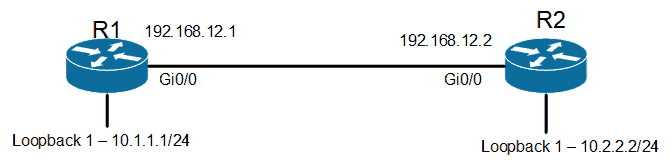
Task 1 - Basic Configuration & IP Addressing (R1)
Router(config)# hostname R1
R1(config)# interface GigabitEthernet0/0
R1(config-if)# ip address 192.168.12.1 255.255.255.0
R1(config-if)# no shutdown
R1(config-if)# exit
R1(config)# interface Loopback1
R1(config-if)# ip address 10.1.1.1 255.255.255.0
Task 2 - Basic Configuration & IP Addressing (R2)
Router(config)# hostname R2
R2(config)# interface GigabitEthernet0/0
R2(config-if)# ip address 192.168.12.2 255.255.255.0
R2(config-if)# no shutdown
R2(config-if)# exit
R2(config)# interface Loopback1
R2(config-if)# ip address 10.2.2.2 255.255.255.0
Task 3 - RIPv2 Configuration
R1 Configuration
R1(config)# router rip
R1(config-router)# version 2
R1(config-router)# no auto-summary
R1(config-router)# network 192.168.12.0
R1(config-router)# network 10.0.0.0
R2 Configuration
R2(config)# router rip
R2(config-router)# version 2
R2(config-router)# no auto-summary
R2(config-router)# network 192.168.12.0
R2(config-router)# network 10.0.0.0
Task 4 - Verification
R1# show ip route rip
R     10.2.2.0/24 [120/1] via 192.168.12.2, 00:00:12, GigabitEthernet0/0

R1# ping 10.2.2.2
Type escape sequence to abort.
Sending 5, 100-byte ICMP Echos to 10.2.2.2, timeout is 2 seconds:
!!!!!
Success rate is 100 percent (5/5)