Objective
Configure Multi-Area OSPF. R1 in Area 1, R2 and R3 in Area 0 (Backbone), and R4 in Area 2.
Lab Topology
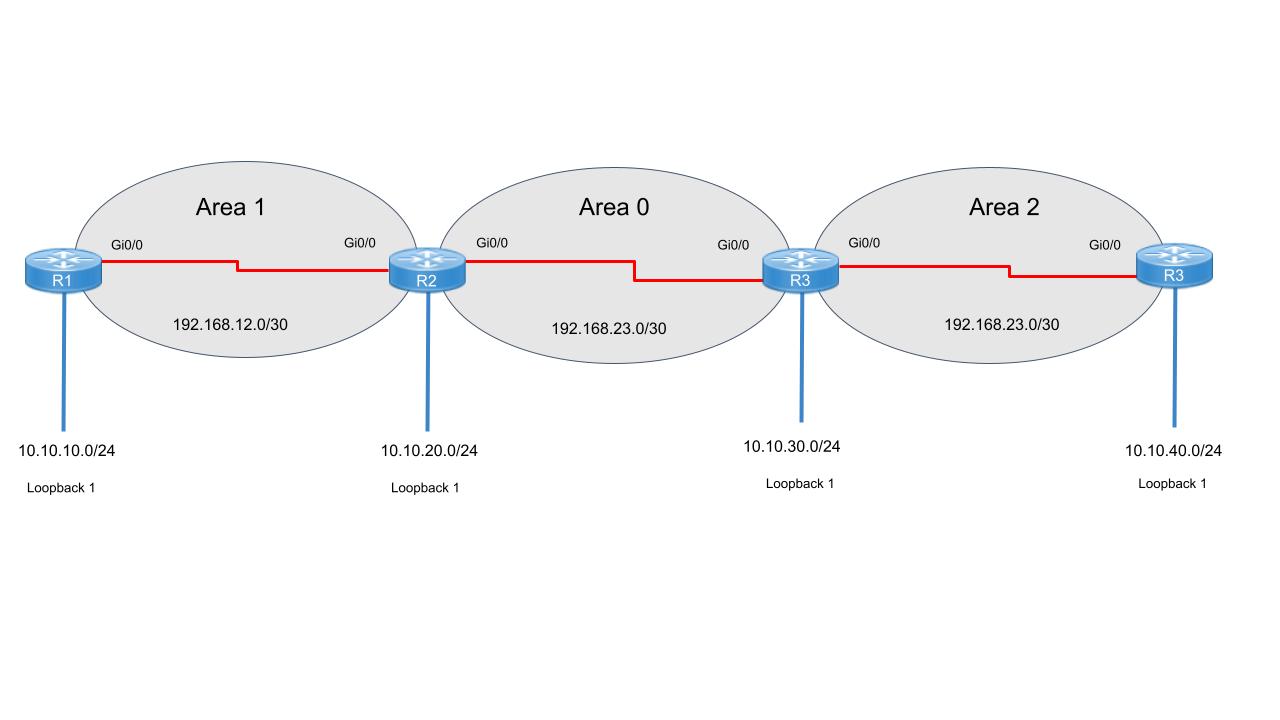
Task 1 - Configure R1 (Internal Area 1)
R1(config)# hostname R1
R1(config)# interface GigabitEthernet0/0
R1(config-if)# ip address 10.1.2.1 255.255.255.0
R1(config-if)# no shutdown
R1(config)# router ospf 1
R1(config-router)# router-id 1.1.1.1
R1(config-router)# network 10.1.1.0 0.0.0.255 area 1
R1(config-router)# network 10.1.2.0 0.0.0.255 area 1
Task 2 - Configure R2 (ABR: Area 1 & 0)
R2(config)# hostname R2
R2(config)# interface Gi0/0 ! To R1
R2(config-if)# ip address 10.1.2.2 255.255.255.0
R2(config-if)# no shutdown
R2(config)# interface Gi0/1 ! To R3
R2(config-if)# ip address 10.2.3.2 255.255.255.0
R2(config-if)# no shutdown
R2(config)# router ospf 1
R2(config-router)# router-id 2.2.2.2
R2(config-router)# network 10.1.2.0 0.0.0.255 area 1
R2(config-router)# network 10.2.3.0 0.0.0.255 area 0
Task 3 - Configure R3 (ABR: Area 0 & 2)
R3(config)# hostname R3
R3(config)# interface Gi0/0 ! To R2
R3(config-if)# ip address 10.2.3.3 255.255.255.0
R3(config-if)# no shutdown
R3(config)# interface Gi0/1 ! To R4
R3(config-if)# ip address 10.3.4.3 255.255.255.0
R3(config-if)# no shutdown
R3(config)# router ospf 1
R3(config-router)# router-id 3.3.3.3
R3(config-router)# network 10.2.3.0 0.0.0.255 area 0
R3(config-router)# network 10.3.4.0 0.0.0.255 area 2
Task 4 - Configure R4 (Internal Area 2)
R4(config)# hostname R4
R4(config)# interface Gi0/0
R4(config-if)# ip address 10.3.4.4 255.255.255.0
R4(config-if)# no shutdown
R4(config)# router ospf 1
R4(config-router)# router-id 4.4.4.4
R4(config-router)# network 10.3.4.0 0.0.0.255 area 2
Task 5 - Verification
Ensure adjacencies are formed and inter-area routes are present in the routing table.
R1# show ip ospf neighbor
R1# show ip route ospf
O IA    10.2.3.0 [110/2] via 10.1.2.2, GigabitEthernet0/0
O IA    10.3.4.0 [110/3] via 10.1.2.2, GigabitEthernet0/0
R1# show ip ospf interface brief