Objective
Configure Open Shortest Path First (OSPF) in a single area (Area 0) to establish full connectivity between three routers.
Lab Topology
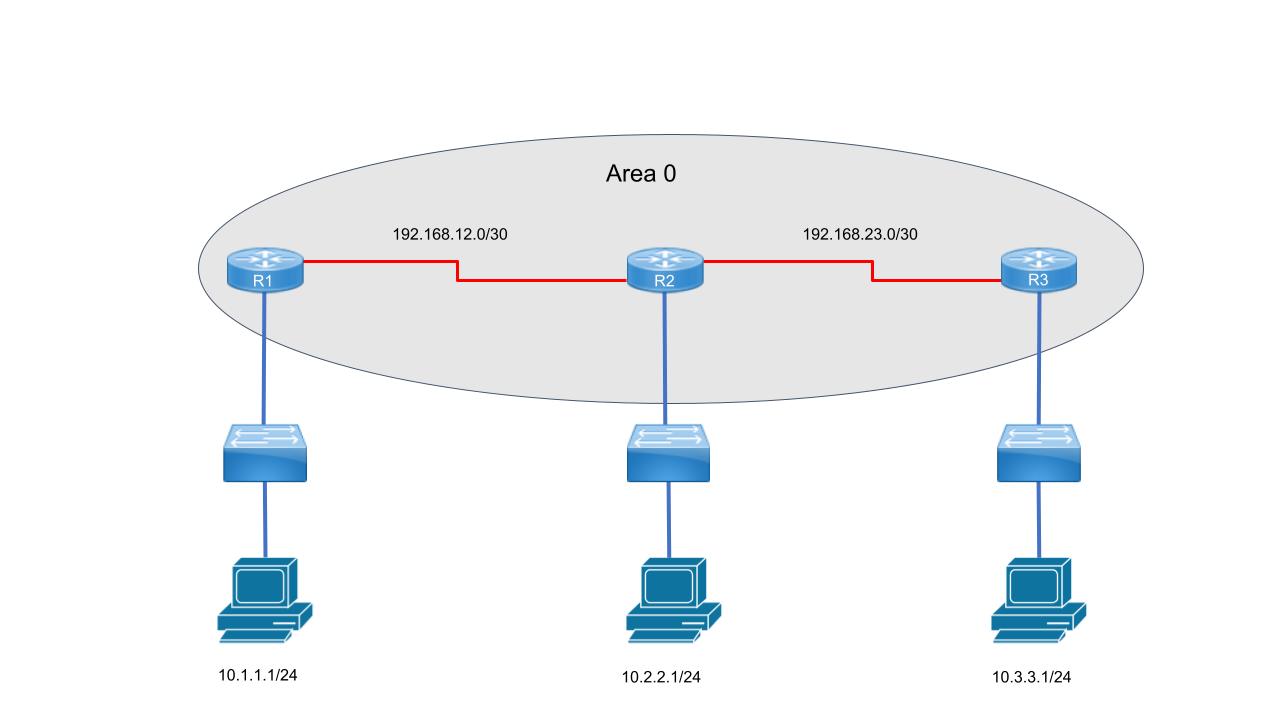
| Device | Interface | IP Address | Subnet Mask | Description |
|---|---|---|---|---|
| R1 | GigabitEthernet0/0 |
10.1.1.1 |
255.255.255.0 |
LAN - R1 Users |
| R1 | Serial0/0/0 |
192.168.12.1 |
255.255.255.252 |
Link to R2 |
| R2 | GigabitEthernet0/0 |
10.2.2.1 |
255.255.255.0 |
LAN - R2 Users |
| R2 | Serial0/0/0 |
192.168.12.2 |
255.255.255.252 |
Link to R1 |
| R2 | Serial0/0/1 |
192.168.23.2 |
255.255.255.252 |
Link to R3 |
| R3 | GigabitEthernet0/0 |
10.3.3.1 |
255.255.255.0 |
LAN - R3 Users |
| R3 | Serial0/0/1 |
192.168.23.3 |
255.255.255.252 |
Link to R2 |
Task 1 - Basic Configuration (All Routers)
Apply hostname, disable DNS lookup, and set a login banner.
R1 - Basic Config
Router> enable
Router# configure terminal
Router(config)# hostname R1
R1(config)# no ip domain-lookup
R1(config)# banner motd # Authorized Access Only - R1 #
R2 - Basic Config
Router(config)# hostname R2
R2(config)# no ip domain-lookup
R2(config)# banner motd # Authorized Access Only - R2 #
Task 2 - Interface Configuration (All Routers)
Configure the IP addresses based on the topology table.
R1 - Interface Config
R1(config)# interface GigabitEthernet0/0
R1(config-if)# ip address 10.1.1.1 255.255.255.0
R1(config-if)# no shutdown
Task 3 - OSPF Configuration
R1(config)# router ospf 1
R1(config-router)# router-id 1.1.1.1
R1(config-router)# network 10.1.1.0 0.0.0.255 area 0
R1(config-router)# network 192.168.12.0 0.0.0.3 area 0
Task 4 - Verification
R2# show ip ospf neighbor
R2# show ip route ospf