Objective
The objective of this lab is to learn and understand how to create VLANs on Cisco switches.
Explanation
- VLANs allow you to segment your network into multiple, smaller broadcast domains.
VLAN Ranges
- Normal Range VLANs (2–1001): Common VLANs used for general segmentation. Can be created, edited, and deleted.
- VLANs 1002–1005: Reserved for legacy protocols like FDDI and Token Ring.
- Valid VLAN ID Range: 1–4094
Lab Topology
Use the provided network topology diagram for this lab exercise.
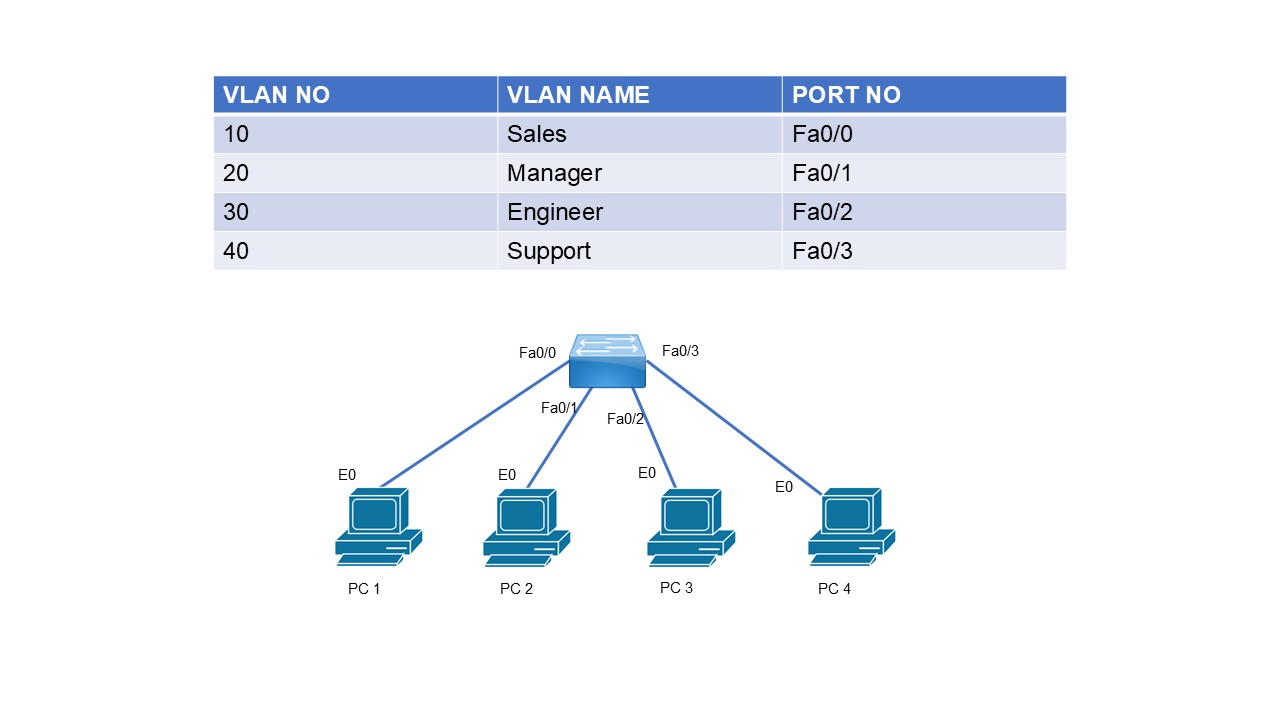
Task 1 – Hostname & VLAN Creation
Configure the hostname of the switch as SW1 and create the VLANs shown in the topology.
Switch# config t
Switch(config)# hostname SW1

SW1(config)# vlan 10
SW1(config-vlan)# name Sales

SW1(config)# vlan 20
SW1(config-vlan)# name Manager

SW1(config)# vlan 30
SW1(config-vlan)# name Engineer

SW1(config)# vlan 40
SW1(config-vlan)# name Support
Task 2 – Interface Configuration
SW1(config)# interface fa0/0
SW1(config-if)# switchport mode access
SW1(config-if)# switchport access vlan 10

SW1(config)# interface fa0/1
SW1(config-if)# switchport mode access
SW1(config-if)# switchport access vlan 20

SW1(config)# interface fa0/2
SW1(config-if)# switchport mode access
SW1(config-if)# switchport access vlan 30

SW1(config)# interface fa0/3
SW1(config-if)# switchport mode access
SW1(config-if)# switchport access vlan 40
Task 3 – Verification
SW1# show vlan brief

VLAN Name                             Status    Ports
---- -------------------------------- --------- -------------------------------
1    default                          active    Fa0/4, Fa0/5, Fa0/6
10   SALES                            active    Fa0/0
20   MANAGERS                         active    Fa0/1
30   ENGINEERS                        active    Fa0/2
40   SUPPORT                          active    Fa0/3
📝 Lab Configuration Scripts
Download or view the complete configuration scripts for this lab:
SW1 Configuration Script